
UWB Sniffer Firmware Upgrade
Packet Analyzer For 802.15.4a UWB Technology
Attention! Be sure that your power supply is stable.
Firmware upgrade procedure
- Download and install LM Flash Programmer.
- Connect UWB Sniffer to your host PC via Ethernet cable.
- Configure host network adapter, IP address 10.10.10.1 and network mask 255.255.255.0.
- Disable all other network interfaces (WiFi, etc).
- Run LM Flash Programmer as an Administrator.
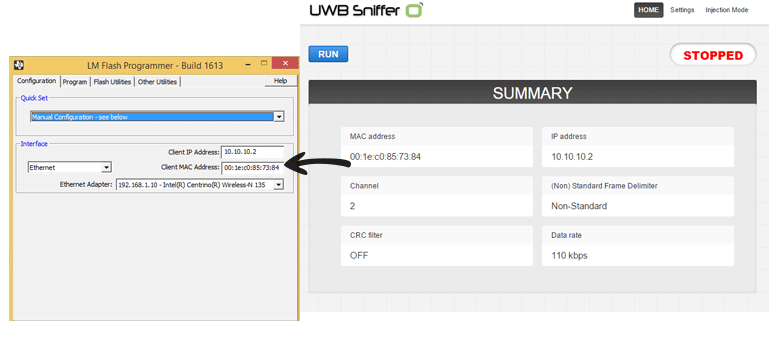
- LM Flash Programmer -> Configuration panel -> Quick Set -> set Manual Configuration.
- LM Flash Programmer -> Interface -> select Ethernet.
- LM Flash Programmer -> Client IP Address and Client MAC Address put settings from the UWB Sniffer homepage.
- LM Flash Programmer -> Ethernet Adapter select the host’s network interface where UWB Sniffer is connected in (should start with 10.10.10.1).
- LM Flash Programmer -> Program tab -> Browse (point to firmware bin file)
- LM Flash Programmer -> Click on the Program button
Note: Firmware upgrade process starts after some delay (up 60 sec) if it is done for the first time.